Stay in sync automatically Pro
Show 1–50 of your latest posts or pull from a selected category or tag. Matching new posts appear automatically.

WordPress Post Carousel Plugin
Handpick and arrange the posts you want to recommend, then publish a responsive carousel without complicated code. Pro adds automatic sources and autoplay.
[stellacodex_carousel id="s1"]✓ Done. Pro automatic sources stay current as you publish.
BRING VALUABLE POSTS BACK INTO VIEW

Readers may leave after one article simply because the next useful post is hard to find. Post Carousel by StellaCodex creates a clear path to related and recommended content, giving older posts a new entrance.
The more useful content you have, the more value your archive can deliver.
FEATURES
Show 1–50 of your latest posts or pull from a selected category or tag. Matching new posts appear automatically.
Add posts by title search, category, or URL, then drag them into the exact order you want readers to see.
Choose one-card, page-by-page, or continuous movement. Set defaults globally, then override individual carousels when needed.
LIVE DEMO
Use the arrows, drag with a mouse, or swipe on a touchscreen.
Use the arrows, mouse drag, or touch swipe. This demo also uses Pro autoplay to advance every four seconds.
HOW TO USE
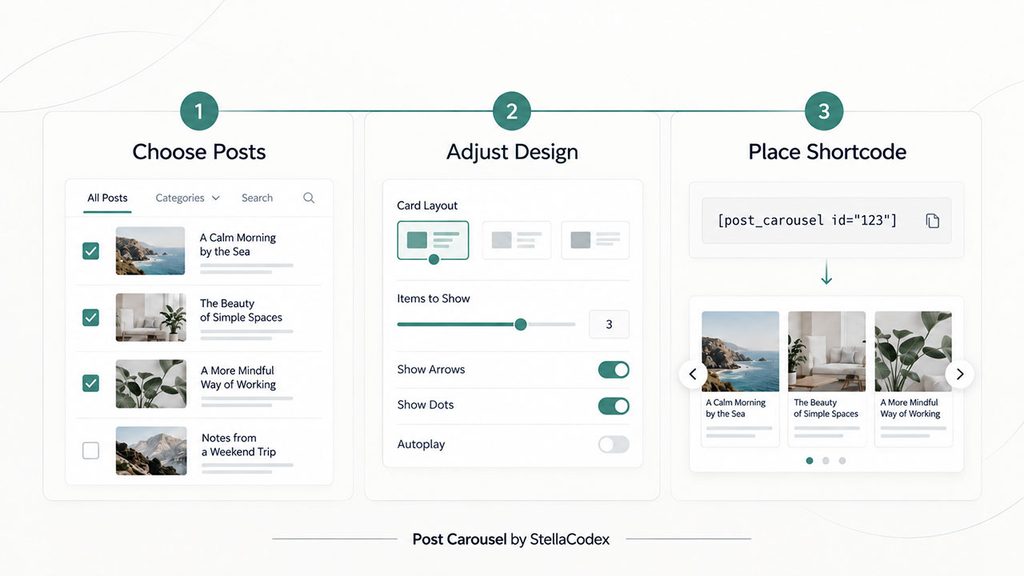
In WordPress, open Post Carousels → Add New. Enter an admin title and an optional heading for visitors.
Handpick posts in Free. Pro adds automatic sources plus global and per-carousel autoplay settings.
Add [stellacodex_carousel id="s1"] to a Shortcode block in any post or page.
Control the reading order
Reduce ongoing updates
FREE & PRO
| Feature | Free | Pro |
|---|---|---|
| Saved carousels | Unlimited | Unlimited |
| Manual post selection and ordering | ● | ● |
| Add by search, category, or URL | ● | ● |
| Responsive design controls | ● | ● |
| Latest/category/tag automatic sources | — | ● |
| One-card and page-by-page autoplay | — | ● |
| Continuous non-stop scrolling | — | ● |
| Auto-insert at the end of all or matching posts | — | ● |
| Carousel categories for organization | — | ● |
CUSTOMIZABLE
Set different card counts for desktop, tablet, and mobile. Decimal values let the next card peek into view and invite readers to keep scrolling.
Create unlimited carousels with the free version.